


Looking for help?
Find answers to your questions
- ACC-C51
- Charge 33
- Charge X20
- Charge C84
- Charge X33
- Charge R65
- Charge i36
- ATA 04
- ATA 02
- ATA 03
- Charge Hub 65
- Charge 70
- Charge C60
- Aerosync Duo User Manual
- AerosynQ Trio 2 User Manual
- AerosynQ B User Manual
- AerosynQ S2 User Manual
- AerosynQ S1 User Manual
- C85R User Manual
- C85 User Manual
- C51 User Manual
- AerosynQ User Manual
- Charge i45 User Manual
- Charge 100 User Manual
- RAAP H100 User Manual
- RAAP G150 User Manual
- RAAP i20 User Manual
- MRS-11
- RAAP C38 User Manual
- Aerosync Trio User Manual
- RAAP G65 User Manual
- Car Connect
- PowerPod Pro User Manual
- PowerPod User Manual
- Aerosync Tripad User Manual
- PP-129T
- Pocket 5
- MiniCharge 11 User Manual
- Powermini 10 User Manual
- AerosynQ Magsurge User Manual
- PowerMini 20 User Manual
- Maglite/ PB 21
- PB 5A
- Xtreme 20K
- Xtreme 10K
- Stylo N20 User Manual
- Loop 10
- Aerosync PB 5A
- Stylo N10 User Manual
- Powerlit Duo 30 User Manual
- Pocket Charge
- Aerosync Mount User Manual
- MiniCharge 20 User Manual
- Force 20K
- Solar 10K User Manual
- Aerosync 65 User Manual
- Aerosync Snap/WLP-12
- Aerosync PB11 User Manual
- Powerlit Duo 30 User Manual
- Aerosync PB Prime User Manual
- Line 20 User Manual
- Line 10 User Manual
- Aerosync PB 12
- Stylo 20K
- Powerlit 45 User Manual
- Aerosync Quad User Manual
- Aerosync PB5
- Powerlit XL Lite User Manual
- Force 10K User Manual
- Powerlit Ultra Lite User Manual
- PP-124
- Stylo Pro User Manual
- Powerlit Boost User Manual
- Stylo 10K
- Powerhub 200 User Manual
- Common User Manual
- Powerlit Ultra
- Stylo Max
- Aerosync PB 10 User Manual
SliQ-2 Wireless

Welcome
Thank you for purchasing the Ambrane SliQ 2 mouse. We recommend you to read the instruction manual carefully before using the product.
Package Contains:
- 1 N Ambrane SliQ 2 Mouse
- 1 N USB Receiver
- 1 N Rating Card
Product Overview:
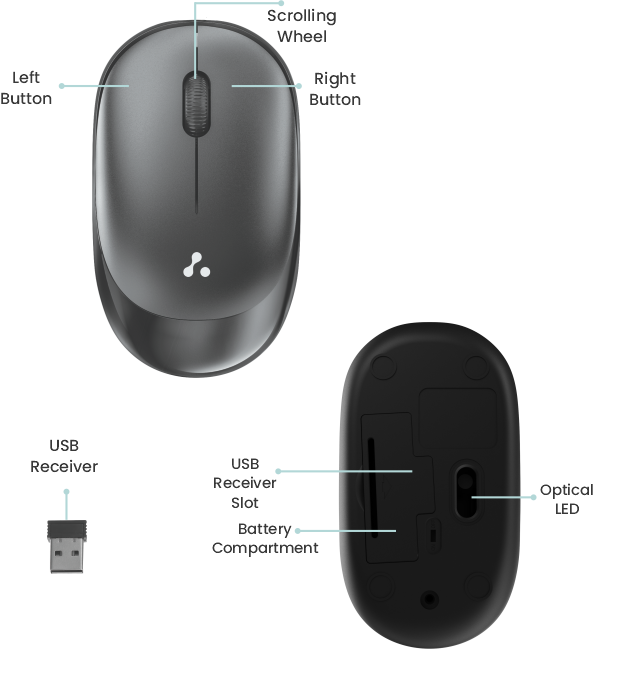
Experience the perfect blend of precision and comfort with the Ambrane SliQ 2 Wireless Mouse. Designed to enhance your computing experience, this sleek wireless optical mouse boasts an ergonomic slim design that fits snugly in your hand, making it an ideal companion for both work and play. Navigate swiftly through documents and web pages with the fast-moving scrolling button, and enjoy accurate tracking on various surfaces, thanks to the advanced optical sensor.
Product Specifications
- Wireless Optical Mouse
- Ergonomic Slim Design
- Fast Moving Scrolling Button
- USB 2.0, Compatible with USB 3.0
- Optical Sensor
- 1600 DPI (Fixed)
- Operating Voltage: 4.5V-5.3V DC
- 3 Button Mouse
- Silent Keys
- Up to 10 meters Bluetooth Range
- Nano USB Receiver
- Tested for 3 Million Clicks
- Compatible with Windows and Mac
- Plug & Play Setup
- 180 Days Warranty
How to Use
- Install 1 AA battery into the mouse.
- Take out the USB receiver from the mouse and plug it into your computer/laptop USB port.
- Your Wireless Mouse installation is now complete.
Note: Just wait for 5 seconds prior to using it for the first time.
Compatibility
This mouse is compatible with MAC and Windows models.
Important Notes
- If the mouse is left unused for more than 2 minutes, it will enter into the dormancy mode. While using it, just move the mouse and it will wake up.
- If the mouse is left unused for more than 5 minutes, it will enter into the deep dormancy mode. While using, just click the right or the left key on the mouse and it will wake up.
Troubleshooting
- If the mouse starts moving slower than its normal speed, please replace its battery.
- If the mouse is not moving smoothly and fluently, please make sure the surface while using is clear and flat.
- After plugging the USB receiver into the USB port, wait for a few seconds to establish the connection. Make sure that the mouse is kept close to the USB port for a fast connection.
- While using, plug in the USB receiver first, otherwise the mouse will enter into dormancy mode without a signal.
CAUTION
- Do not use the mouse on glass or smooth surfaces.
- Keep the receiver plugged in while in use.
- Do not disassemble the mouse or the USB receiver.
- Please use a dry and soft cotton cloth to clean the mouse.
Note: Any damage caused by physical impact, Water/liquid, fire etc caused by the customer or nature shall not be covered under warranty. Only product design, feature and functionality-related faults will be considered.
Updated on 31 Mar 2026
What are your Feelings?
Thanks for your feedback.
- Choosing a selection results in a full page refresh.