


Looking for help?
Find answers to your questions
- ACC-C51
- Charge 33
- Charge X20
- Charge C84
- Charge X33
- Charge R65
- Charge i36
- ATA 04
- ATA 02
- ATA 03
- Charge Hub 65
- Charge 70
- Charge C60
- Aerosync Duo User Manual
- AerosynQ Trio 2 User Manual
- AerosynQ B User Manual
- AerosynQ S2 User Manual
- AerosynQ S1 User Manual
- C85R User Manual
- C85 User Manual
- C51 User Manual
- AerosynQ User Manual
- Charge i45 User Manual
- Charge 100 User Manual
- RAAP H100 User Manual
- RAAP G150 User Manual
- RAAP i20 User Manual
- MRS-11
- RAAP C38 User Manual
- Aerosync Trio User Manual
- RAAP G65 User Manual
- Car Connect
- PowerPod Pro User Manual
- PowerPod User Manual
- Aerosync Tripad User Manual
- PP-129T
- Pocket 5
- MiniCharge 11 User Manual
- Powermini 10 User Manual
- AerosynQ Magsurge User Manual
- PowerMini 20 User Manual
- Maglite/ PB 21
- PB 5A
- Xtreme 20K
- Xtreme 10K
- Stylo N20 User Manual
- Loop 10
- Aerosync PB 5A
- Stylo N10 User Manual
- Powerlit Duo 30 User Manual
- Pocket Charge
- Aerosync Mount User Manual
- MiniCharge 20 User Manual
- Force 20K
- Solar 10K User Manual
- Aerosync 65 User Manual
- Aerosync Snap/WLP-12
- Aerosync PB11 User Manual
- Powerlit Duo 30 User Manual
- Aerosync PB Prime User Manual
- Line 20 User Manual
- Line 10 User Manual
- Aerosync PB 12
- Stylo 20K
- Powerlit 45 User Manual
- Aerosync Quad User Manual
- Aerosync PB5
- Powerlit XL Lite User Manual
- Force 10K User Manual
- Powerlit Ultra Lite User Manual
- PP-124
- Stylo Pro User Manual
- Powerlit Boost User Manual
- Stylo 10K
- Powerhub 200 User Manual
- Common User Manual
- Powerlit Ultra
- Stylo Max
- Aerosync PB 10 User Manual
SliQ-2 Wired
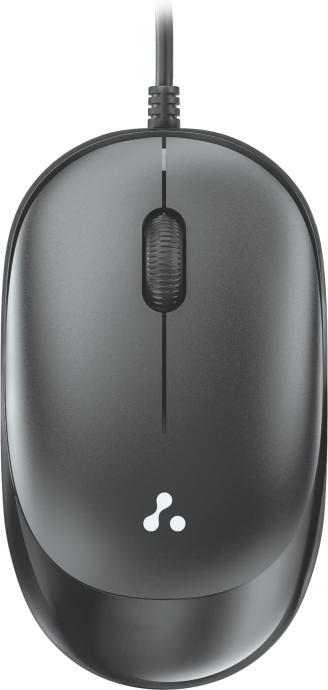
Welcome
Thank you for purchasing the Ambrane SliQ 2 Wired mouse. We recommend you to read the instruction manual carefully before using the product.
Package Contains:
- 1 N Ambrane SliQ 2 Wired Mouse
- 1 N Rating Card
Product Overview:

Experience the epitome of precision and comfort with the Ambrane SliQ 2 Wired Optical Mouse. Crafted to amplify your computing journey, this sleek optical mouse merges ergonomic design with advanced features. The slim design seamlessly fits into your hand, enhancing your comfort during extended usage. Navigate seamlessly through tasks with responsive clicks and enjoy the precision offered by the advanced optical sensor.
Product Specifications
- Wired Optical Mouse
- Ergonomic Slim Design
- 1.5m Cable Length
- USB 2.0, Compatible with USB 3.0
- Precise Optical Sensor
- 1600 DPI (Fixed)
- Operating Voltage: 4.5V-5.3V DC
- Weight: 71 grams
- 3 Button Mouse
- USB Interface
- Compatibility: Windows 2000, XP, Vista, Windows 10, 11
- Durable Body
- 180 Days Warranty
How to Use
- Connect the mouse to an available USB port on your computer.
- When connecting for the first time, wait for around 15 seconds until the generic driver is installed.
- The mouse installation is now complete.
Compatibility
This mouse is compatible with USB-enabled MAC and Windows models.
Troubleshooting
In case of incorrect operation, follow the steps below:
- Check the integrity of the connectors.
- Verify the connection to the computer.
- Review your computer settings.
- Disconnect and reconnect the equipment; restart the computer.
- If the problem persists, please contact our support team.
Safety Notes
- Keep the equipment dry and away from precipitation, humidity, liquids, and condensation.
- Do not use the product with wet hands.
- Avoid using or storing the equipment in dusty or dirty areas.
- Keep the equipment within a moderate temperature range to prevent damage.
- Avoid dropping, knocking, or shaking the equipment, as it may cause damage.
Updated on 10 Oct 2025
What are your Feelings?
Thanks for your feedback.
- Choosing a selection results in a full page refresh.