


Looking for help?
Find answers to your questions
- Charge D100
- AerosynQ Trio 3 Charger User Manual
- Charge CR96
- AerosynQ 2 Charger User Manual
- ACC-C51
- Charge 33 Charger User Manual
- Charge X20
- Charge C84 User Manual
- Charge X33 User Manual
- Charge R65 User Manual
- Charge i36 User Manual
- ATA 04
- ATA 02
- ATA 03
- Charge Hub 65 User Manual
- Charge 70 Charger User Manual
- Charge C60
- Aerosync Duo User Manual
- AerosynQ Trio 2 User Manual
- AerosynQ B User Manual
- AerosynQ S2 User Manual
- AerosynQ S1 User Manual
- C85R User Manual
- C85 User Manual
- C51 User Manual
- AerosynQ User Manual
- Charge i45 User Manual
- Charge 100 User Manual
- RAAP H100 User Manual
- RAAP G150 User Manual
- RAAP i20 User Manual
- MRS-11
- RAAP C38 User Manual
- Aerosync Trio User Manual
- RAAP G65 User Manual
- Car Connect
- PowerPod Pro User Manual
- PowerPod User Manual
- Aerosync Tripad User Manual
- AerosynQ Hub 100 Charger User Manual
- SmartStrip 3 User manual
- ASP 01
- SmartStrip 2 User Manual
- SmartStrip Auto User Manual
- SmartStrip 2 Pro User Manual
- SliQ Glow+ User Manual
- SliQ Glow User Manual
- SliQ 3 User Manual
- KeyFlex User Manual
- KeyPop User Manual
- SliQ-2 Wired
- SliQ-2 Wireless
- KeyFlex Combo User Manual
- SmartStrip+ User Manual
- SmartStrip User Manual
- TroneX User Manual
- Trone User Manual
- OP-WLGC01
- SliQ User Manual
- AerosynQ Snap 2 Power Bank User Manual
- Powerlit Ultra 240 User Manual
- Stellar 40K User Manual
- Stellar 20K User Manual
- AerosynQ Orbit 20K User Manual
- PP-129T
- Pocket 5
- MiniCharge 11 User Manual
- Powermini 10 User Manual
- AerosynQ Magsurge User Manual
- PowerMini 20 User Manual
- Maglite/ PB 21
- PB 5A
- Xtreme 20K
- Xtreme 10K
- Stylo N20 User Manual
- Loop 10
- Aerosync PB 5A
- Stylo N10 User Manual
- Powerlit Duo 30 User Manual
- Pocket Charge
- Aerosync Mount User Manual
- MiniCharge 20 User Manual
- Force 20K User Manual
- Solar 10K User Manual
- Aerosync 65 User Manual
- Aerosync Snap/WLP-12
- Aerosync PB11 User Manual
- Powerlit Duo 30 Power Bank User Manual
- Aerosync PB Prime User Manual
- Line 20 User Manual
- Line 10 User Manual
- Aerosync PB 12
- Stylo 20K
- Powerlit 45 User Manual
- Aerosync Quad User Manual
- Aerosync PB5
- Powerlit XL Lite User Manual
- Force 10K User Manual
- Powerlit Ultra Lite User Manual
- PP-124
- Stylo Pro User Manual
- Powerlit Boost User Manual
- Stylo 10K
- Powerhub 200 User Manual
- Common User Manual
- Powerlit Ultra User Manual
- Stylo Max
- Aerosync PB 10 User Manual
RAAP C38 User Manual
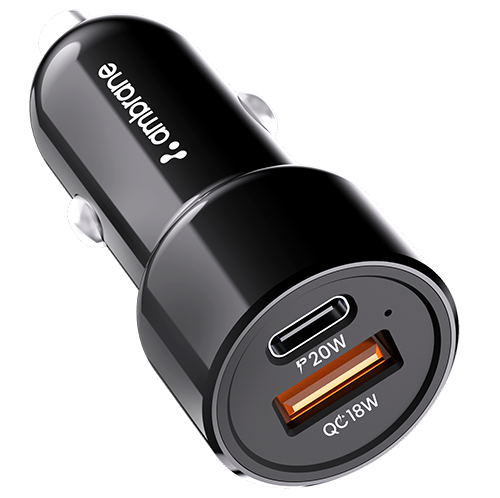
Welcome
Thank you for purchasing the RAAP C38 Car Charger. We recommend you to read the instruction manual carefully before using the product.
Package Contains:
- 1 N RAAP C38 Car Charger
- 1 N Rating Card
Product Overview:

Product Introduction
Built to fuel your favourite devices on the go, the RAAP C38 brings a convenient way of charging. Equipped with Power Delivery (PD) technology and 38W combined output, it gives blazing-fast charging speed. Enabled with 1 PD Type-C and 1 Quick-Charge (QC) USB output, the compact charger comes with multi-layer protection that shields your devices against excessive current, overheating and more, giving you a safe charging experience every time. In addition, its compact design makes it super handy to travel with on your long car rides.
Product Specifications
- Model: RAAP C38
- Colour: Black
- Input: DC 12-24V
- PD Output: DC 5V=3A, 9V=2.22A, 12V=1.67A, 20W
- QC Output: DC 5V=3A, 9V=2A, 12V=1.5A, 18W
- Compatible: Universal
- Protection: Over Current, Short Circuit, Output Over Voltage and Over Temperature
- Warranty: 180 Days
OPERATING INSTRUCTIONS

- Insert the charger into the cigarette lighter socket.
- Connect an external device(s) to the charger using an USB Type-A or Type-C charging cable.
- After use, disconnect the USB Type-A or Type-C cable from the charging socket and unplug the charging from the cigarette lighter socket.
NOTE: It is recommended to use the charger only after starting the vehicle's engine to avoid discharging of the vehicle's battery.
CLEANING & MAINTENANCE
- Unplug the charger before cleaning.
- During cleaning do not immerse the charger in water or other liquids. Never hold the charger under running water.
- To clean the charger, wipe with a soft, slightly moist cloth.
- Never use corrosive detergents, wire brushes, abrasive scourers, metal or sharp utensils to clean the charger.
- Store the charger in its original packaging in a dry area. Keep away from children and pets.
IMPORTANT SAFETY INSTRUCTIONS
- This manual contains important safety and operating instructions.
- Before using the battery charger, read all instructions and cautionary markings on battery charger, battery, and product using battery.
- CAUTION - To reduce risk of injury, charge only rechargeable batteries. Other types of batteries may burst causing injury to persons and damage.
- Do not expose the charger to rain, moisture, or snow.
- Use of an attachment not recommended or sold by the battery charger manufacturer may result in a risk of fire, electric shock, or injury to persons.
- Do not operate the charger with a damaged cigarette lighter connector - replace it immediately.
- Do not operate the charger if it has received a sharp blow, been dropped, or otherwise damaged in any way; take it to a qualified service person.
- Do not disassemble the charger.
- To reduce risk of electric shock, unplug charger before attempting any maintenance or cleaning.
- Connect the charger to a 12 V or 24 V electrical system only. Some vehicles operate on 36 V electrical systems. Refer to the vehicle operator's manual.
- Using the charger for extended periods of time can completely discharge your vehicle's battery. Unplug the charger whenever the engine is switched off for extended periods of time. The power does not turn off after switching off the engine in some vehicles. If the charger is left connected, your vehicle's battery may become discharged.
- When connecting external USB cable(s), route them in a manner that does not interfere with driving.
Updated on 18 May 2026
What are your Feelings?
Thanks for your feedback.
- Choosing a selection results in a full page refresh.