


Looking for help?
Find answers to your questions
- ACC-C51
- Charge 33
- Charge X20
- Charge C84
- Charge X33
- Charge R65
- Charge i36
- ATA 04
- ATA 02
- ATA 03
- Charge Hub 65
- Charge 70
- Charge C60
- Aerosync Duo User Manual
- AerosynQ Trio 2 User Manual
- AerosynQ B User Manual
- AerosynQ S2 User Manual
- AerosynQ S1 User Manual
- C85R User Manual
- C85 User Manual
- C51 User Manual
- AerosynQ User Manual
- Charge i45 User Manual
- Charge 100 User Manual
- RAAP H100 User Manual
- RAAP G150 User Manual
- RAAP i20 User Manual
- MRS-11
- RAAP C38 User Manual
- Aerosync Trio User Manual
- RAAP G65 User Manual
- Car Connect
- PowerPod Pro User Manual
- PowerPod User Manual
- Aerosync Tripad User Manual
- PP-129T
- Pocket 5
- MiniCharge 11 User Manual
- Powermini 10 User Manual
- AerosynQ Magsurge User Manual
- PowerMini 20 User Manual
- Maglite/ PB 21
- PB 5A
- Xtreme 20K
- Xtreme 10K
- Stylo N20 User Manual
- Loop 10
- Aerosync PB 5A
- Stylo N10 User Manual
- Powerlit Duo 30 User Manual
- Pocket Charge
- Aerosync Mount User Manual
- MiniCharge 20 User Manual
- Force 20K
- Solar 10K User Manual
- Aerosync 65 User Manual
- Aerosync Snap/WLP-12
- Aerosync PB11 User Manual
- Powerlit Duo 30 User Manual
- Aerosync PB Prime User Manual
- Line 20 User Manual
- Line 10 User Manual
- Aerosync PB 12
- Stylo 20K
- Powerlit 45 User Manual
- Aerosync Quad User Manual
- Aerosync PB5
- Powerlit XL Lite User Manual
- Force 10K User Manual
- Powerlit Ultra Lite User Manual
- PP-124
- Stylo Pro User Manual
- Powerlit Boost User Manual
- Stylo 10K
- Powerhub 200 User Manual
- Common User Manual
- Powerlit Ultra
- Stylo Max
- Aerosync PB 10 User Manual
OP-WLGC01
Welcome
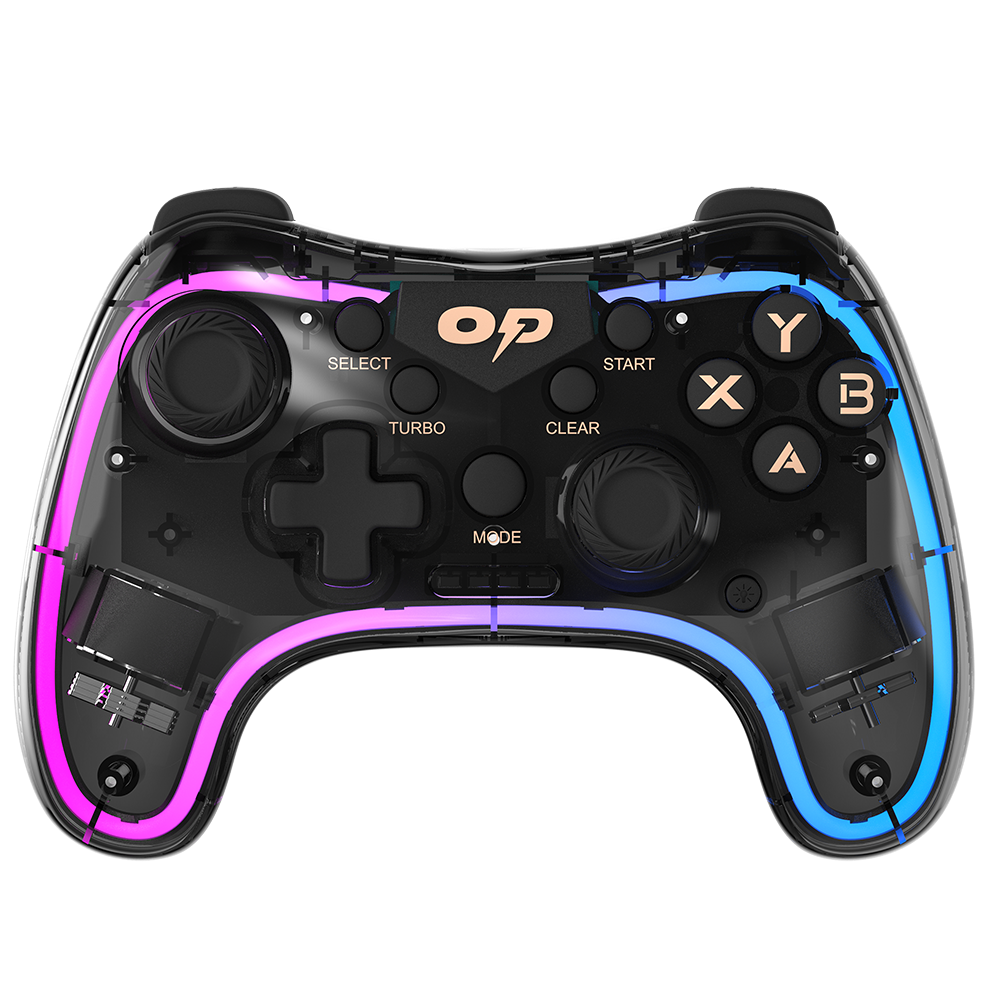
Thank you for purchasing the Ambrane OverPowered OP-WLGC01 gaming controller. We recommend you to read the instruction manual carefully before using the product.
Package Contains:
- 1 N OP-WLGC01 Gaming Controller
- 1 N USB Receiver
- 1 N Charging Cable
- 1 N User Manual Scan Card
- 1 N Rating Card
Product Overview

How to Charge
- Kindly charge the Ambrane OverPowered OP-WLGC01 gaming controller with a 5V DC USB power input, using the charging cable given inside the package.
- Ensure that the device is fully charged before first-time usage. You can notice that the LED indication turns OFF, once the device is fully charged.
How to Wake Up from Sleep Mode
When the gaming controller is left unused for an extended period of time, it enters into sleep mode. To wake it up again, press the HOME key. Now, you can begin to play games.
How to Reset?
The Reset button is present on the back of the controller. If you face any issues, just press the back button of the game controller.
Note: If you want to turn OFF the game controller, press the left joystick + Select button together.
Connection & Modes
X-Input Mode (Default)

- Connect the receiver to the computer.
- After the system recognizes the game controller, you can use the game controller to play games.
Note: Press the A+MODE button to switch to X-Input mode while under other modes.
D-Input Mode
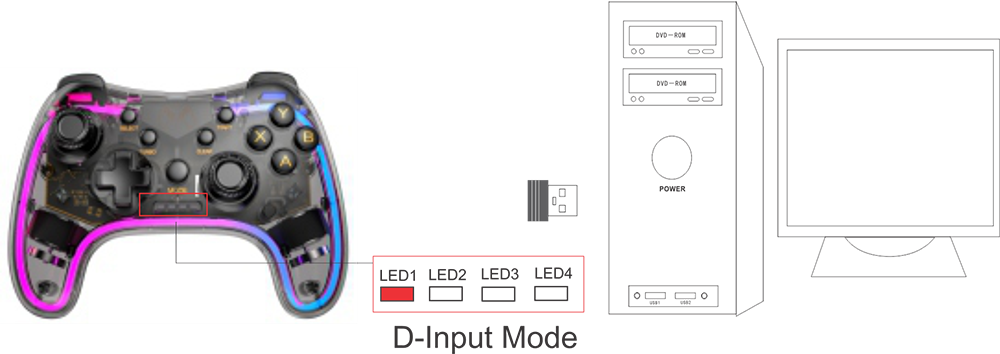
Press the Y+MODE button while connected to the computer. The mode will switch to D-Input Mode and the LED will tum to LED1.
Android Controller Mode

Press the B+MODE button while connected to the Android device. The mode will switch to Android Controller Mode and the LED will tum to LED2.
PS3 Controller Mode

Press the X+MODE button while connected to the PS3 device. The mode will switch to PS3 Controller Mode and the LED will turn to LED3.
Turbo Speed Function
Buttons can be set to the Turbo speed (short function buttons): A/B/X/Y/L/ZL/R/ZR buttons
Enable/Disable the Turbo speed function:
Step 1: Press the TURBO button along with any function button simultaneously to enable the Turbo speed function.
Step 2: Press the same buttons along with the CLEAR button to disable the Turbo speed function.
Warning
- Use only the supplied charging cable to charge this product.
- If you hear a suspicious sound, smoke, or a strange smell, stop using this product.
- Do not expose this product or the battery it contains to microwaves, high temperatures, or direct sunlight.
- Do not let this product come in contact with liquids or handle it with wet or greasy hands. If liquid gets inside, stop using this product.
- Do not subject this product or the battery it contains to excessive force.
- Do not pull on the cable or bend it sharply.
- Do not touch this product while it is charging during a thunderstorm.
- Keep this product and its packaging out of reach of young children. Packaging elements could be ingested. The cable could wrap around children’s necks.
- People with injuries or problems with fingers, hands or arms should not use the vibration function.
- Do not attempt to disassemble or repair this product or the battery pack.
- If either is damaged, stop using the product.
- If the product is dirty, wipe it with a soft, dry cloth. Avoid the use of thinner, benzene or alcohol.
- The battery has a limited life span. Battery duration will gradually decrease with repeated usage and age. Battery life also varies depending on the storage method, conditions of use and environmental factors.
- Charge in an environment where the temperature range is between 10°C- 30°C (50°F – 86°F). Charging may not be as effective when performed in other environments.
- When the wireless controller is not used for an extended period of time, it is recommended that you fully charge it at least once a year to help maintain battery functionality.
If you face any difficulty in using the product, kindly reach out to our customer care team:
Phone: +911145911111, Email: care@ambraneindia.com
If you are happy with the purchase, kindly follow us and review us on our social media handles @ambraneindia.
Updated on 30 Aug 2025
What are your Feelings?
Thanks for your feedback.
- Choosing a selection results in a full page refresh.